
Follow us:
Clients
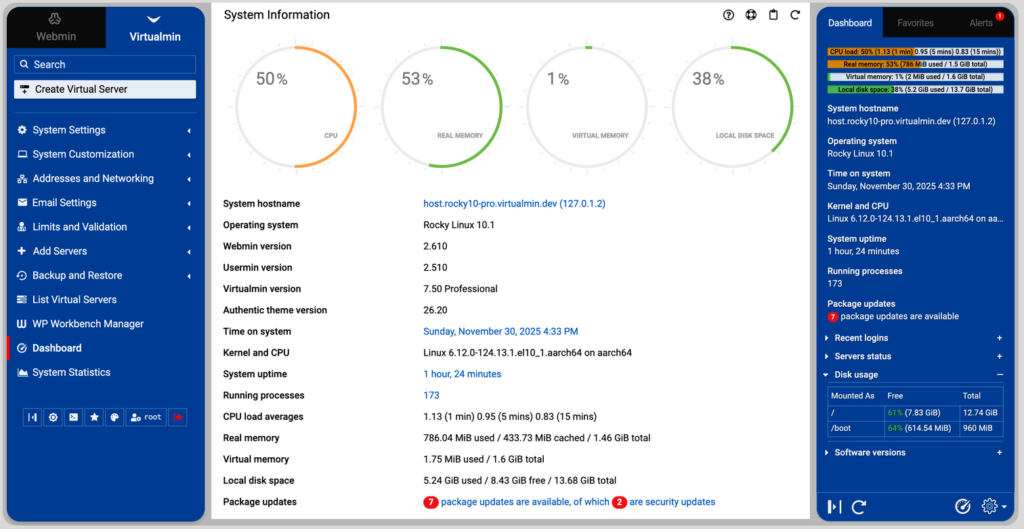
Managing a Virtual Private Server (VPS) doesn’t have to be complicated. One of the biggest factors that determines how easy or difficult it is to manage your server is the VPS hosting control panel you choose.
A control panel provides a graphical interface that allows you to perform server administration tasks without relying entirely on command-line tools. Whether you’re hosting a business website, multiple client sites, or custom applications, the right VPS hosting panel can save time, simplify management, and reduce the risk of configuration errors.
In this guide, we’ll explain what a VPS control panel is, why it matters, the most important features to consider, and how to determine which option best fits your needs.
What Is a VPS Hosting Control Panel?
A VPS hosting control panel is software that provides a web-based interface for managing your server and hosting environment.
Instead of manually configuring services through terminal commands, a control panel allows you to perform everyday tasks with just a few clicks, such as:
- Creating websites and domains
- Managing email accounts
- Installing SSL certificates
- Configuring databases
- Monitoring server resources
- Creating backups
- Managing users and permissions
For many businesses, a quality VPS control panel makes server administration significantly easier while reducing the technical expertise required for routine management.
Popular VPS Hosting Control Panels
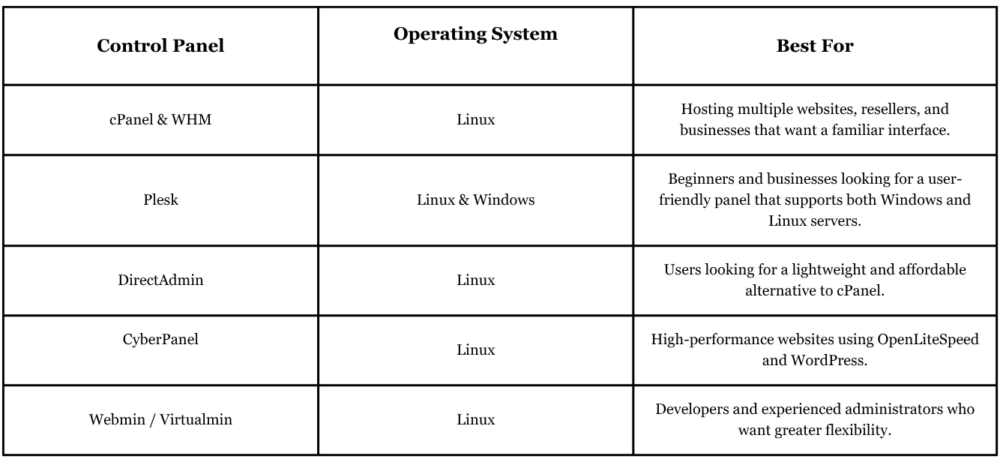
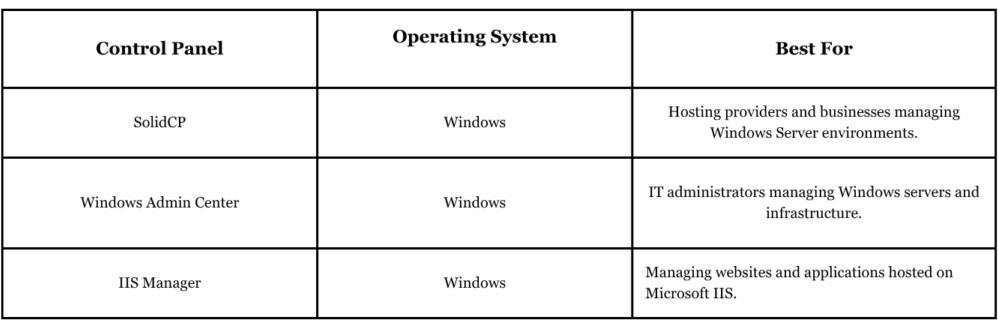
Not every VPS hosting panel offers the same features. Some are designed for beginners who want an easy-to-use interface, while others provide advanced tools for developers and system administrators. Choosing the right control panel depends on your operating system, technical experience, and the type of websites or applications you plan to host.
Here are some of the most widely used VPS control panels:
Which VPS Hosting Panel Should You Choose?
If you’re new to VPS hosting, Plesk is often one of the easiest options because of its intuitive interface and support for both Linux and Windows servers.
If you’re managing Linux websites and want the industry standard, cPanel & WHM remains one of the most popular choices thanks to its extensive features and large support community.
For developers looking for speed and flexibility, CyberPanel and Webmin provide more customization while maintaining excellent performance.
If your VPS runs Windows Server, Plesk, Windows Admin Center, and IIS Manager are among the most common tools for managing websites, databases, and server resources.
Why Does the Control Panel Matter?
Think of your VPS like a professional kitchen.
Without a control panel, you’re working directly with the equipment, wiring, and utilities. Every adjustment requires technical knowledge and precision.
With a control panel, you’re using organized controls that make everything easier to access and manage. The server performs the same tasks, but the experience becomes faster, more efficient, and far less intimidating.
The right VPS hosting panel helps reduce administrative overhead while allowing you to spend more time focusing on your website or business instead of server maintenance.
Who Should Use a VPS Hosting Control Panel?
A VPS control panel is beneficial for a wide range of users, including:
- Small and medium-sized businesses
- Website owners managing multiple domains
- Developers hosting applications
- Digital agencies
- E-commerce businesses
- Freelancers managing client website
- Organizations without a dedicated server administrator
Even experienced system administrators often use control panels to automate repetitive tasks and improve efficiency.
Features to Look for in a VPS Hosting Panel
Not every control panel offers the same capabilities. Before choosing one, consider the features that will make server management easier for your specific environment.
User-Friendly Interface
A clean, organized dashboard reduces the learning curve and makes everyday tasks much easier.
Look for panels that clearly organize services such as websites, databases, email accounts, DNS settings, backups, and security tools.
The easier the interface is to navigate, the less time you’ll spend searching for common functions.
Website and Domain Management
If you host multiple websites, managing domains efficiently is essential.
A good VPS hosting control panel should allow you to:
- Add multiple domains
- Configure subdomains
- Manage DNS zones
- Redirect websites
- Install SSL certificates
These tools simplify website administration without requiring manual configuration files.
Resource Monitoring
Understanding how your server performs helps prevent problems before they affect users.
Look for dashboards that display:
- CPU usage
- Memory utilization
- Disk space
- Network activity
- Bandwidth consumption
These insights allow you to identify bottlenecks and determine when additional resources may be needed.
Backup and Recovery
Mistakes happen, and hardware issues can occur unexpectedly.
A reliable VPS hosting panel should make backups simple by allowing you to:
- Schedule automatic backups
- Restore previous versions
- Store backup copies securely
- Recover individual files when necessary
Having dependable backup options adds another layer of protection for your data.
Security Features
Security should always be a priority when managing a VPS.
An effective control panel should include features such as:
- Firewall management
- SSL certificate installation
- User permission controls
- Malware scanning
- Security updates
- Login protection
These capabilities help protect both your server and the websites running on it.
Application Installation
Many businesses rely on applications like WordPress, Joomla, Drupal, or other content management systems.
Some VPS hosting panels include one-click installers that significantly reduce deployment time.
Instead of manually configuring databases and application files, installations can often be completed in just a few minutes.
Should You Choose a Managed or Self-Managed VPS?
The control panel is only one part of the overall hosting experience.
If you’re comfortable managing updates, security patches, server optimization, and troubleshooting, a self-managed VPS may provide the flexibility you’re looking for.
However, many businesses prefer managed solutions because they eliminate much of the technical workload.
This is where Managed Cloud Services become especially valuable. They provide expert assistance with server maintenance, monitoring, security, and optimization, allowing your team to focus on business growth rather than infrastructure management.
Choosing the Right VPS Hosting Control Panel
The best control panel depends on your goals and technical experience.
If you manage several websites, look for strong domain management features.
If security is your highest priority, focus on panels with built-in security tools and backup automation.
If you’re new to VPS hosting, prioritize ease of use and a clean interface.
Remember that the control panel doesn’t change your server’s hardware performance, it changes how efficiently you can manage it.
Choosing software that matches your workflow can improve productivity and make server administration much less stressful.
Making the Best Choice for Long-Term Success
A VPS hosting control panel is much more than a convenience; it is the primary tool you’ll use to manage your hosting environment every day. Selecting the right panel can simplify routine tasks, strengthen security, improve efficiency, and help you maintain a reliable server as your business grows.
Rather than choosing based solely on popularity, consider your technical skills, the number of websites you manage, and the features you’ll use most often. A well-chosen control panel can save time, reduce administrative complexity, and make managing your VPS a much smoother experience for years to come.
Ready to Simplify Your VPS Management?
Whether you’re launching your first VPS or looking for a more efficient way to manage an existing server, choosing the right control panel is only part of the equation. Pairing your VPS with expert support and reliable infrastructure can make server management even easier.
Explore SoftSys Hosting’s managed solutions to find a hosting environment that combines performance, security, and professional assistance, so you can focus on growing your business instead of managing your servers.